








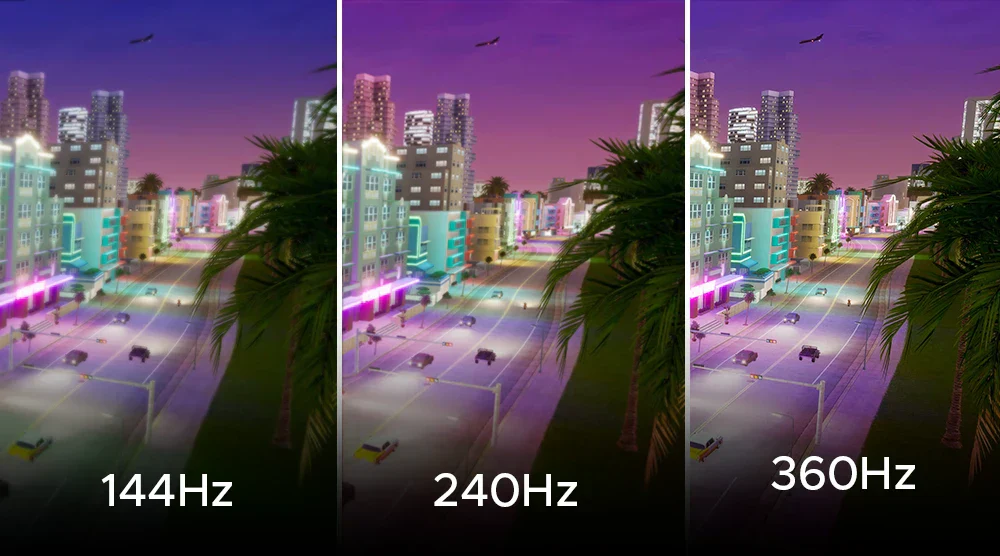
A good screen can make a familiar game feel cleaner, faster, and less tiring. The hard part is knowing which number deserves your money. For most players, refresh rate matters more first because it changes how often new frames can appear, but response time decides whether those frames stay sharp or smear together. That means the better buy is not the monitor with the loudest “1ms” badge. It is the one that matches your graphics card, your games, and your eyes. A 240Hz esports screen makes sense for a Valorant player chasing every peek. A 144Hz or 165Hz display may feel perfect for a college student in Ohio playing Fortnite, Call of Duty, and single-player RPGs after class. If you want buying advice that cuts past spec-sheet noise, practical consumer tech guides can help you think like a real shopper, not a marketing target. NVIDIA also explains that FPS is produced by the PC, while Hz is how often the display shows finished frames, so the screen and the GPU have to work together.
What the Two Specs Actually Control
The fight between speed specs starts because both numbers sound like they describe the same thing. They do not. One controls how often the screen can present a new image. The other controls how fast pixels shift from one shade to another. When those jobs line up, games feel clear. When they do not, you notice blur, trails, tearing, or a strange delay that makes your aim feel heavy.
Why Hz Changes the Feel of a Game
A 60Hz display updates far less often than a 144Hz, 165Hz, or 240Hz model. That gap changes how much new visual information reaches your eyes while you track a target across the screen. In a shooter, it can make a strafing enemy easier to follow. In a racing game, it can make corners feel smoother because the road motion has more steps between each turn.
This is why competitive players care about high Hz panels. NVIDIA’s latency guide says enabling the highest available display setting can reduce scanout delay, which is part of the time it takes for a frame to appear on screen. That does not make a slow player great overnight. It removes one small layer of drag from the setup.
The non-obvious part is that high Hz only shines when your PC can feed it enough frames. A 240Hz screen paired with a weak graphics card may spend much of its life showing fewer frames than it can handle. At that point, you paid for headroom, not constant benefit.
Why Pixel Speed Still Matters
Response time describes how quickly a pixel changes from one color or shade to another. A low number sounds better, but the way brands measure it can be messy. Many monitors advertise a best-case gray-to-gray figure that does not tell you how the screen behaves across all transitions.
This is where gaming monitor response time becomes more than a sticker on the box. A screen can claim 1ms and still show inverse ghosting when its overdrive mode is pushed too hard. You may see pale trails behind dark objects or bright halos around moving players. That is not speed. That is the panel being forced past its clean limit.
A good example is a budget VA panel sold as “1ms” for gamers. In a slow RPG, it may look rich and deep because VA contrast is often strong. In a dark hallway shooter, black smearing can make motion look muddy. Same number on the box. Different experience in your hands.
Where Refresh Rate Wins for Competitive Players
If your main games are fast, online, and reaction-heavy, screen update speed deserves first attention. Not because the other number is fake, but because more frames can change the way you read motion. The jump from 60Hz to 144Hz is the one most everyday players notice first. Past that, gains get smaller, yet serious esports players may still care because smaller delays add up.
The 60Hz to 144Hz Jump Feels Bigger Than the Marketing Suggests
Moving from 60Hz to 144Hz feels like wiping dust off a window. Mouse movement becomes easier to judge. Camera pans stop looking so choppy. A target crossing your view in Apex Legends or Counter-Strike gives your eyes more positions to follow.
The gain is not magic. It is timing. A 60Hz display has a larger gap between each screen update than a 144Hz display. When those gaps shrink, motion feels more connected to your hand. NVIDIA describes system latency as the delay between a mouse or keyboard action and the resulting pixel change on the display, which is the delay gamers feel when input and screen response do not line up.
For a U.S. buyer building a first gaming desk around a midrange RTX or Radeon card, 144Hz or 165Hz at 1080p or 1440p is often the sane target. It gives a clear speed lift without forcing every setting to low. That balance matters more than chasing a huge number you cannot keep active.
Why 240Hz and 360Hz Are Not for Everyone
High-end esports displays can make sense, but only for a narrow kind of player. If you play Valorant, Counter-Strike 2, Overwatch, Rocket League, or Fortnite on low settings with a PC that can push huge frame counts, 240Hz or higher can feel cleaner. Your aim corrections have more visual steps. Your flicks feel less like guesses.
But the gap from 144Hz to 240Hz is not as dramatic as the leap from 60Hz. That is the part stores rarely say out loud. The more speed you already have, the less each added step changes the feel. You may still notice it, but the gain becomes more personal.
That money may be better spent elsewhere. A better mouse, lower-latency keyboard, stronger GPU, or stable wired internet connection can do more for many players than a faster panel. For buying plans, a guide on best gaming setup upgrades should sit beside any monitor shortlist.
Why Gaming Monitor Response Time Can Make or Break Motion Clarity
Speed without clean pixel behavior is a half-win. A high-Hz panel gives you more chances to see new frames, but the pixels still have to settle before the next image arrives. If they lag behind, the screen looks smeared. If overdrive is too aggressive, the screen shows strange bright trails. That is why motion clarity depends on both timing and pixel control.
The “1ms” Label Can Hide Bad Overdrive
Many shoppers see “1ms” and stop reading. That is risky. Brands often reach that figure in a mode that creates ugly artifacts. The setting may look sharp in a lab pattern, then fall apart when you pan through a night map or move a white crosshair over a dark wall.
Gaming monitor response time should be judged by clean motion, not the lowest advertised number. A 3ms or 4ms real-world result with low ghosting can look better than a claimed 1ms mode filled with overshoot. Your eyes do not care what the box promised. They care whether the picture stays readable.
A small test helps. Watch independent motion tests, then check whether the reviewer recommends “normal,” “fast,” or “medium” overdrive. If the fastest mode looks worse, that is not a defect. It is the panel telling you where its natural limit sits.
OLED Changes the Conversation, but Not the Whole Buying Decision
OLED gaming monitors have raised expectations because their pixel transitions are much faster than most LCD panels. That makes motion look clean, especially in fast scenes. A 240Hz OLED can feel sharper than a 240Hz LCD with slower dark transitions.
Still, OLED is not an automatic answer for every U.S. buyer. Price, text clarity, brightness behavior, burn-in care, and room lighting still matter. A student using the same screen for spreadsheets, browser tabs, and games may prefer a strong IPS display. A single-player fan who loves horror games might accept OLED care habits because black levels look stunning.
VESA has tried to reduce confusion around motion claims with standards such as AdaptiveSync Display, which focuses on gaming displays with high frame rates and low latency, and logo values such as 144, 165, 240, or 360 that show tested capability at native resolution. That kind of third-party signal matters because brand labels alone can be too generous.
Input Lag, GPU Power, and the Specs Nobody Should Ignore
The screen is only one part of the chain. Your mouse click travels through the mouse, USB polling, CPU, game engine, GPU render queue, cable, display processing, and panel. That is why input lag can feel bad even on a monitor with decent specs. A clean purchase means looking at the whole path.
Input Lag Is Not the Same as Pixel Speed
Input lag is the delay between your action and the screen showing the result. Response time is about pixel transition after the frame reaches the panel. Mixing those two up leads to bad buys. You may choose a “1ms” display and still feel delay if the screen processing is slow or your game settings create a long render queue.
NVIDIA’s Reflex Analyzer materials describe system latency as the time from mouse click to visible pixel change, which is a broader measurement than panel pixel speed alone. That is the number competitive players feel when they say a setup is “snappy.”
This is also why console players should think differently. A PlayStation 5 or Xbox Series X owner playing at 120fps does not need a 360Hz monitor. A good 120Hz or 144Hz HDMI 2.1 screen with low processing delay makes more sense. Buying past your device output is not future-proofing if you never use it.
Your Graphics Card Sets the Ceiling
A monitor cannot invent frames your PC does not render. If your graphics card averages 90fps in a demanding 1440p game, a 240Hz panel will still display the game with 90 new frames per second. The screen may reduce some latency through faster scanout, but it will not turn a heavy game into an esports title.
This is where buyers get trapped. They compare two screens in a store, then forget their own machine at home. A 4K 240Hz monitor sounds exciting, but many players will need expensive hardware or lowered settings to make it worthwhile. A 1440p 165Hz screen may give a better mix of sharpness, speed, and cost.
For a player building around a midrange PC, match the screen to the frame range you can hold in your favorite games. Then leave a little headroom. Your monitor should fit the games you play on Tuesday night, not the benchmark you saw in a launch video. A deeper checklist on PC hardware buying mistakes can save money before checkout.
Conclusion
The smarter choice is not picking one spec and ignoring the other. It is deciding which weakness would bother you more during the games you play most. If you play competitive shooters, racing games, or fast battle royale matches, the screen’s Hz target should come first because it changes how motion and aim feel. If you play dark, cinematic, or visually rich games, pixel behavior matters more than the sticker suggests. A slow panel can ruin motion clarity even when the spec sheet looks proud. For most American gamers, the sweet spot is a 144Hz or 165Hz display with honest response behavior, low input lag, and enough resolution for the desk size. Refresh rate deserves the first look, but response time earns the final approval before you buy. Read reviews, match the panel to your GPU, and choose the screen that makes your real games feel controlled.
Frequently Asked Questions
Is 144Hz enough for most gaming?
Yes, 144Hz is enough for most players, especially at 1080p or 1440p. It feels much smoother than 60Hz and does not demand extreme PC hardware. Competitive players may want more, but casual and mixed-game users often land happily at 144Hz or 165Hz.
Does 1ms response time always mean a better monitor?
No, a 1ms claim can be misleading. Some monitors reach that number only with aggressive overdrive that creates ghosting or bright trails. Clean motion at a slightly higher measured time can look better than a messy “fastest” mode.
Should I buy 240Hz for console gaming?
Usually no. Current major consoles target up to 120fps in supported games, so a strong 120Hz or 144Hz monitor is enough. Spend the extra money on better image quality, HDMI 2.1 support, good HDR, or a larger screen.
What matters more for esports games?
High Hz, low input lag, and clean pixel transitions all matter, but Hz usually comes first. Esports games reward fast visual feedback. After that, check independent tests for overshoot, ghosting, and real delay instead of trusting the box alone.
Why does my high-Hz monitor still feel laggy?
Your PC may not be producing enough frames, your game settings may add delay, or the monitor may have slow processing. Check that Windows is set to the screen’s highest Hz mode, use the right cable, and lower heavy graphics settings.
Is OLED better for fast gaming?
OLED can be excellent for fast gaming because pixel transitions are extremely quick. Motion often looks cleaner than on many LCD panels. Still, price, brightness, text use, and burn-in care matter, so it is not the right answer for every desk.
What is ghosting on a gaming monitor?
Ghosting is a trail or shadow that follows moving objects. It happens when pixels cannot change fast enough for the motion on screen. Bad overdrive can also create inverse ghosting, where bright halos appear behind objects instead of darker smears.
What monitor speed should a first-time buyer choose?
A 144Hz or 165Hz display with good reviewed motion performance is the safest pick. Choose 1080p for budget esports builds and 1440p for sharper all-around gaming. Avoid paying for 240Hz or higher unless your PC and games can feed it.